How to use a repeater: offsets, tones and what to say
A repeater listens on one frequency and transmits on another. Everything else is detail.
The short answer
To use a repeater you need its output frequency, the offset direction and size, and its CTCSS or DCS tone. On 2 metres the standard offset is 600 kHz and on 70 cm it is 5 MHz. Program the output frequency, set the offset, set the tone, then key up and say your callsign. That is the whole procedure.
- 2 m offset
- 600 kHz
- 70 cm offset
- 5 MHz
- 6 m offset
- 1 MHz
- Common tone
- 100.0 Hz
- Typical range
- 20 to 50 miles
- License needed
- Technician
A repeater is a radio on a hill that listens on one frequency and simultaneously retransmits what it hears on another, with far more height and power than you have. It is the reason a 5 W handheld in a valley can talk to somebody forty miles away, and it is where almost every new Technician makes their first contact.
The mechanics confuse people for exactly one reason: your radio has to transmit on a different frequency than it receives on, and it has to send a subaudible tone to prove it is a legitimate user rather than noise. Once those two ideas land, repeater operation is easier than simplex.
This page covers what a repeater does, how to program one from a directory listing, what to say, and what to do when you key up and nothing happens.
Offset: why you transmit on a different frequency
A repeater cannot listen and transmit on the same frequency at the same time, so it uses a pair. The frequency you hear is the output. The frequency you transmit on is the input, and it sits a fixed distance away. That distance is the offset, and its direction is either plus or minus.
By convention the offset is standardised per band, so you almost never have to think about the input frequency at all. Set the output frequency and tell the radio the offset, and it works out the rest.
Standard offsets
Repeater offsets by band in the United States
| Band | Offset | Direction convention |
|---|---|---|
| 6 m | 1 MHz | Minus below 52 MHz, plus above |
| 2 m | 600 kHz | Minus below 147 MHz, plus above |
| 1.25 m | 1.6 MHz | Minus |
| 70 cm | 5 MHz | Plus in most of the country |
| 33 cm | 12 MHz | Minus |
| 23 cm | 20 MHz | Minus |
Directory listings state the offset explicitly, and a handful of repeaters use a non-standard split. The repeater offsets and tones reference has the full table including the odd splits.
CTCSS and DCS: the tone that opens the door
Most repeaters require a subaudible tone alongside your voice before they will repeat you. CTCSS, sometimes called PL, is a continuous low-frequency tone below the audible passband, from 67.0 Hz up to 254.1 Hz. DCS is a digital equivalent using a repeating code. Either way the effect is the same: without it, the repeater hears you and does nothing.
The tone exists to stop the repeater keying up on distant stations, noise, and interference from other systems on the same frequency. It is not security and it is not privacy. Anybody can look up the tone and transmit it.
- Tone encode
- Your radio sends the tone when you transmit. This is what you almost always need. On most radios the setting is called T, TONE or T-CTCS.
- Tone squelch
- Your radio only opens its speaker when it hears a matching tone on receive. Useful on a busy shared frequency, and a good way to sit in silence wondering why the repeater is dead if you set it by mistake. Usually shown as TSQ or T-SQL.
- Split tone
- A different tone on transmit than on receive. Rare, but some linked systems use it.
- DCS
- A digital code rather than an analogue tone, written as a three-digit number such as D023. Configured the same way in the menu but on a separate setting.
Programming a repeater into your radio
You need four pieces of information from a repeater directory, and directories list them in this order.
From a directory listing to a working channel
- 1
Take the output frequency
For example 146.940 MHz. This is the number you tune the radio to. It is the frequency you will hear.
- 2
Set the offset
For 146.940 the convention is minus 600 kHz, so your radio will transmit on 146.340. Most radios apply the standard offset automatically once you enter a frequency in the repeater subband.
- 3
Set the transmit tone
Enter the tone from the listing, such as 100.0 Hz, as CTCSS encode. Leave receive tone off until you have a reason to want it.
- 4
Save it to a memory channel and name it
A radio with a hundred memories and no names is useless in the car. Name the channel for the town or the club, not the frequency.
- 5
Verify with a reverse check
Almost every radio has a reverse button that temporarily swaps input and output. Press it: if you can hear the other station directly, they are close enough to work on simplex. If you hear nothing, you are genuinely going through the repeater.
Doing this by hand on a handheld keypad is slow and error-prone. Programming from a computer takes minutes for a hundred channels and is covered step by step in how to program a Baofeng, which applies to nearly every inexpensive handheld. You will need the right cable, such as a BTECH PC03 FTDI programming cable for most Baofeng and BTECH radios or a USB programming cable for Kenwood TM-V71 and TM-D710 for Kenwood-style two-pin plugs.
What to actually say
This is the part that stops people, and the answer is much less formal than expected. Repeater operation is a conversation, not a procedure.
- To announce you are there: your callsign, then "monitoring". For example "KX0ABC monitoring". That tells anyone listening that you are available.
- To call a specific person: their callsign then yours. "W1XYZ, this is KX0ABC."
- To join a conversation: wait for a gap, say your callsign once, and wait. Do not say "break" unless you have something urgent, and do not say "break break" unless it is an emergency.
- To end a transmission: pass it back with their callsign or just say your own. Legally you must identify at least every ten minutes and at the end of a contact.
- Leave a gap of one to two seconds before you transmit. Repeaters often have a courtesy tone, and other stations need room to join. Keying instantly on the tail is how people get a reputation.
When you key up and nothing happens
- No repeater tail at all
- You are not opening it. Check the tone first, then the offset direction. The tone is wrong far more often than the frequency.
- You hear the repeater but nobody answers
- Normal. Most repeaters are quiet most of the time. Announce, wait a minute, try again later, or look up the club net schedule.
- You open it from the driveway but not from the house
- The handheld rubber duck is the problem. A Nagoya NA-771C 15-inch whip whip roughly doubles usable range for fifteen dollars, and an outdoor Diamond X50A dual-band base antenna vertical turns a marginal repeater into a solid one.
- Your audio is reported as scratchy or full quieting drops out
- You are at the edge of coverage. More antenna height beats more power every time on VHF. See VHF range for what height buys you.
- The repeater keys up but cuts you off after a minute
- That is the timeout timer doing its job. Keep transmissions short and let go of the button.
Gear that makes repeater work reliable
What actually changes your results
In order of effect per dollar. The antenna is always the first upgrade, never the radio.

Nagoya
Nagoya NA-771C 15-inch whip
A real gain whip in place of the stock rubber duck. The cheapest meaningful improvement anyone can make to a handheld.
Check priceUnder $25

Diamond Antenna
Diamond X50A dual-band base antenna
A dual-band base vertical on the roof. Height and gain together turn marginal repeaters into daily ones.
Check priceUnder $250

Yaesu
Yaesu FT-60R
A handheld with a receiver front end that stays usable near commercial transmitters, which is where cheap radios fall apart.
Check priceUnder $250

Yaesu
Yaesu FTM-150R ASP
A 50 W mobile. Five times the power of a handheld and a proper antenna on the roof of the car.
Check priceUnder $500
Comet
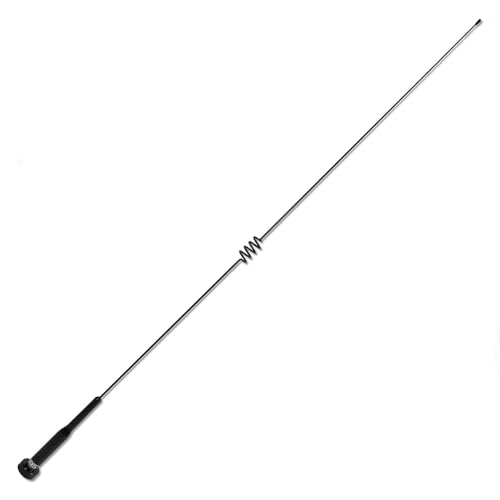
Comet SBB-5NMO dual-band mobile antenna
A dual-band mobile whip on a real NMO mount, which is the other half of any mobile installation.
Check priceUnder $100

Baofeng
Baofeng BF-850 speaker mic
A speaker microphone keeps the antenna away from your head, which helps both your RF exposure evaluation and your audio.
Check priceUnder $25
The complete list, priced with a running total, is in the Technician starter station build.
Common questions
Questions people ask about this
Do I need a license to talk on a repeater?
Yes. Any transmission on amateur frequencies requires at least a Technician license, which covers all VHF and UHF repeater operation. Listening requires nothing at all, and listening to your local repeaters while you study is the best possible preparation. The Technician exam is 35 questions and most people pass after ten to fifteen hours of study.
How do I find repeaters near me?
Online repeater directories and club websites list output frequency, offset, tone and coverage area for every coordinated repeater. Local club sites are usually the most accurate because they maintain the machine. Failing that, ask on a local net, since regulars know which listings are stale and which repeaters are actually busy.
What is a courtesy tone?
A short beep the repeater sends after each transmission ends, once the timeout timer has reset. Its purpose is to tell you the repeater is ready and to leave a defined gap where another station can break in. Waiting for the courtesy tone before you transmit is basic good manners on any machine that has one.
Why does my radio show high SWR only on the repeater input frequency?
Because you transmit on the input and receive on the output, and an antenna cut or tuned for the output can be noticeably worse a few hundred kilohertz away. It is more common on 2 metres with a narrow-bandwidth antenna. Tune for the middle of the range you actually use, or fit an antenna with enough bandwidth to cover both.
Can I use a repeater for a regular chat?
Yes, that is exactly what most of them are for. The etiquette is to keep transmissions reasonably short, leave gaps for others, identify every ten minutes, and move to a simplex frequency if you and one other station are going to talk for an hour. A repeater is a shared resource, not a private channel, and treating it that way keeps you welcome.
Keep going
Related on this site
- First radio after Technician The radio that gets a new licensee onto repeaters.
- J-pole length calculator Element lengths for a 2 m or 70 cm J-pole, copper or twin lead.
- Handheld whip vs roll-up J-pole The cheapest upgrade to a handheld is the antenna.
- Baofeng UV-5R vs Quansheng UV-K5 Which budget handheld to buy for your first repeater contact.
- Programming a cheap handheld Get a hundred repeaters into the radio in ten minutes.
- Offsets and tones reference Every standard offset and the full CTCSS tone list.
- Technician starter station The whole kit priced, radio through antenna.
- Best handheld radios Where the money is worth spending, and where it is not.
Disclaimer Researched guidance for planning purposes, not professional engineering, electrical or legal advice. Antenna work, RF exposure, mast and tower work, grounding and battery handling all carry real risk that depends on your specific site and installation. Verify anything safety-critical against current FCC rules, the National Electrical Code and the manufacturer's own documentation, and hire a professional where the job calls for one. We research equipment from published specifications, regulatory documents and verified owner reviews rather than claiming hands-on testing we have not done.