How to program a Baofeng: CHIRP, cables and the menu
Do it from a computer. The keypad method exists for one channel in an emergency.
The short answer
The reliable way to program a Baofeng is CHIRP, which is free software, plus a genuine USB cable with an FTDI or Prolific chip. Download from the radio first to get a working image, edit the memory channels in the spreadsheet view, then upload. Never upload a file downloaded from a different radio model.
- Software
- CHIRP, free
- Cable chip
- FTDI or Prolific
- Time for 100 channels
- About 10 minutes
- First step, always
- Download from radio
- Keypad method
- One channel, VFO to MR
- Most common failure
- Counterfeit cable chip
The Baofeng UV-5R and its many relatives are the cheapest way into the hobby and the most frustrating radios to program by hand. The menu system is a numbered list with no context, the manual is a translation, and entering one repeater takes about a dozen keypresses that must happen in the right order.
The answer is CHIRP. It is free, it runs on Windows, macOS and Linux, it knows several hundred radio models, and it presents the memory as a spreadsheet you can paste into. With a working cable, loading a hundred local repeaters is a ten minute job you do once.
This guide covers the cable, the software, the download-edit-upload cycle, and the manual keypad method for the one time you need a channel in the field with no computer. It applies almost unchanged to BTECH, TIDRADIO, Quansheng and Retevis handhelds.
The cable is the part that goes wrong
Nearly every reported CHIRP failure is a cable problem, and specifically a counterfeit USB-to-serial chip. Cheap cables use cloned Prolific PL2303 chips that current drivers deliberately refuse to talk to. The radio is fine, the software is fine, and the port simply never appears.
- Buy a cable that names its chipset. A BTECH PC03 FTDI programming cable uses a genuine chip and is the least troublesome option for Baofeng-style two-pin plugs.
- A USB programming cable for Kenwood TM-V71 and TM-D710 covers the same two-pin K1 connector used by most inexpensive handhelds, including Baofeng, BTECH, TIDRADIO and Wouxun.
- Push the plug fully home. The two-pin connector needs firm seating and a half-inserted plug reads as no radio.
- On macOS and Linux the device appears as a serial port with a name containing usbserial or ttyUSB. On Windows it is a COM port in Device Manager.
- If Device Manager shows a yellow warning triangle on the port, the chip is a clone. No amount of driver reinstallation fixes that permanently.
The CHIRP cycle
Download, edit, upload
- 1
Install the current CHIRP build
The project moved to a Python 3 build and the old daily builds no longer work on modern systems. Get the current release rather than whatever a forum post from years ago links to.
- 2
Download from the radio first, every single time
Radio, then Download From Radio. This gives CHIRP the exact memory layout of your specific model and firmware. Editing a blank template and uploading it is the number one way people brick a radio into a state that needs a factory reset.
- 3
Edit in the memories spreadsheet
Each row is a channel. Fill in receive frequency, offset direction, offset size, tone mode, tone, mode and a name. You can paste rows in from a spreadsheet, which is how a whole county of repeaters gets loaded at once.
- 4
Set tone mode to Tone, not TSQL, for a normal repeater
Tone sends the CTCSS tone and does not require one to hear. TSQL also mutes your speaker unless the incoming signal carries a matching tone, which makes a working repeater sound dead.
- 5
Save the image file before you upload
A .img file per radio, dated. When something goes wrong, a known good image is a two minute recovery instead of a rebuild from scratch.
- 6
Upload to radio and power cycle
Radio, then Upload To Radio. Leave the radio alone during the transfer. Turn it off and on afterwards and check a channel you know works.
What goes in each column
CHIRP columns
Filling a memory row for a typical 2 metre repeater
| Column | Example | What it means |
|---|---|---|
| Frequency | 146.940 | The repeater output. What you hear. |
| Duplex | - | Offset direction. Minus below 147 MHz on 2 m. |
| Offset | 0.600000 | Offset size in MHz. 5.000000 on 70 cm. |
| Tone Mode | Tone | Send CTCSS on transmit only. |
| Tone | 100.0 | The CTCSS tone from the directory. |
| Mode | FM | NFM only if the system is narrowband. |
| Name | CLUB146 | Up to seven characters on most models. |
| Power | High | Low saves battery on a strong repeater. |
For a simplex channel, set Duplex to blank and Tone Mode to none. The national 2 metre simplex calling frequency is 146.520 and belongs in every radio.
Programming from the keypad, when you must
This is the classic UV-5R sequence. It is worth knowing once, for the roadside case where somebody gives you a frequency and you have no laptop.
- Press VFO/MR until the display shows frequency mode rather than a channel number.
- Press A/B so the upper line is selected. The UV-5R only transmits properly from the A side in this mode.
- Type the repeater output frequency on the keypad, all six digits.
- Menu, 13, Menu, enter the CTCSS tone with the arrows, Menu to confirm, Exit. That is T-CTCS, the transmit tone.
- Menu, 26, Menu, choose the offset direction, Menu, Exit. That is SFT-D.
- Menu, 27, Menu, type the offset such as 000.600, Menu, Exit. That is OFFSET.
- Menu, 27 on some firmware is MEM-CH. Find MEM-CH, Menu, pick an empty channel number, Menu. The display should say the channel stored.
- Press VFO/MR to return to memory mode and check the new channel.
If that felt unpleasant, that is the correct reaction, and it is why the cable exists. Menu numbers also move between firmware versions, which is the other reason nobody does this twice.
Channels worth having in every radio
- Every repeater within about fifty miles, named by town.
- 146.520 MHz simplex, the national 2 metre calling frequency.
- 446.000 MHz simplex, the 70 cm equivalent.
- Your club net frequency, at the top of the list where you can find it.
- NOAA weather channels, which most of these radios receive. Receive only, and set them so you cannot transmit there.
- A few local simplex channels for talking to people you arrived with.
What to buy
Cable, radio and the upgrade that matters
A working cable and a better antenna transform a cheap handheld. A more expensive radio is the third priority, not the first.
BTECH
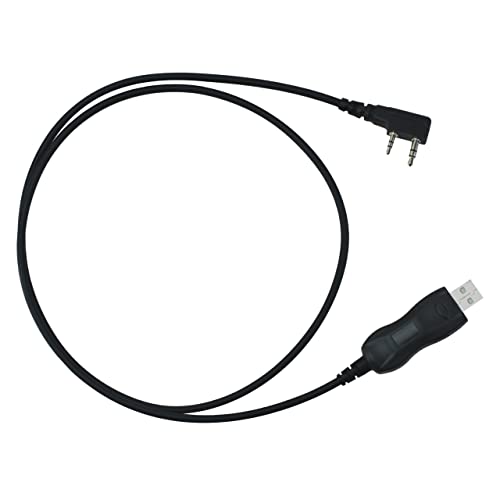
BTECH PC03 FTDI programming cable
A programming cable with a chipset that current drivers still talk to. The single most common fix for a CHIRP problem.
Check priceUnder $25
Baofeng
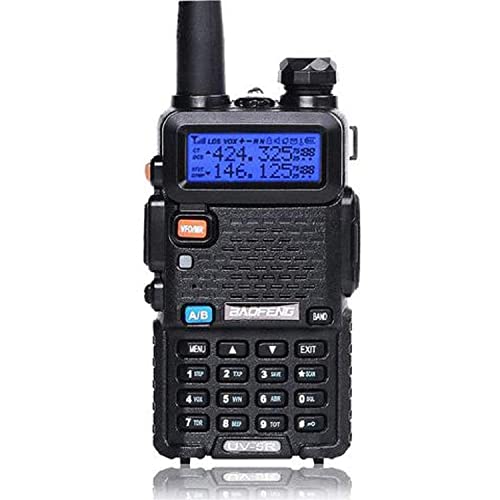
Baofeng UV-5R
The radio itself. Still the cheapest way to find out whether you enjoy the hobby before spending real money.
Check priceUnder $25

Nagoya
Nagoya NA-771C 15-inch whip
A gain whip that roughly doubles usable range. Buy this before you consider a different radio.
Check priceUnder $25

Baofeng
Baofeng UV-5R 3800 mAh USB-C battery, 2-pack
An extended battery turns a weekend radio into an all-day one. The stock pack is the other weak point.
Check priceUnder $25

Quansheng
Quansheng UV-K5
The alternative cheap handheld, with a wideband receiver and an active modification community.
Check priceUnder $50

TIDRADIO
TIDRADIO TD-H8
Adds Bluetooth programming from a phone, which sidesteps the cable question entirely on a supported model.
Check priceUnder $250
Common questions
Questions people ask about this
Why does CHIRP say it cannot find my radio?
Almost always the cable. Cheap programming cables use cloned USB-to-serial chips that current drivers refuse to communicate with, so no serial port appears for CHIRP to select. Check that a port shows up in Device Manager or as a usbserial device, push the two-pin plug fully home, and if the port has a warning icon, replace the cable with one that names a genuine chipset.
Can I copy a CHIRP file from someone with the same radio?
Share the CSV export, not the .img file. An image contains model-specific calibration and band-edge data, and writing another radio image into yours can leave it transmitting at the wrong power or refusing to transmit at all. A CSV holds only channel data and imports cleanly into any radio CHIRP supports.
What is the difference between Tone and TSQL?
Tone sends a CTCSS tone when you transmit and leaves your receiver open to everything. TSQL does both: it sends the tone and also mutes your speaker unless an incoming signal carries the matching tone. For normal repeater use you want Tone. Setting TSQL by mistake is the usual reason a repeater that works for everyone else sounds silent on your radio.
Should I use FM or NFM?
Use wide FM unless the system is specifically narrowband. Most amateur repeaters remain wideband. Setting NFM on a wideband repeater makes your transmitted audio sound quiet and slightly distorted at the far end while sounding perfect to you, which makes it a hard fault to diagnose from your side.
Is a Baofeng worth buying at all?
As a first radio, yes. It costs less than the exam and the study guide together, and it tells you whether you enjoy the hobby before you spend real money. Its weakness is receiver selectivity, so it struggles in areas with strong commercial transmitters. Spend the first upgrade money on an antenna rather than a second cheap radio.
Keep going
Related on this site
- Baofeng UV-5R vs Quansheng UV-K5 The two cheapest handhelds, and which one is worth programming.
- How to use a repeater Offsets, tones and what to say once the radio is programmed.
- Best handheld radios Where a better radio actually helps.
- Best handheld antennas The upgrade that beats a new radio.
- The Technician license What you need before you press the key.
Disclaimer Researched guidance for planning purposes, not professional engineering, electrical or legal advice. Antenna work, RF exposure, mast and tower work, grounding and battery handling all carry real risk that depends on your specific site and installation. Verify anything safety-critical against current FCC rules, the National Electrical Code and the manufacturer's own documentation, and hire a professional where the job calls for one. We research equipment from published specifications, regulatory documents and verified owner reviews rather than claiming hands-on testing we have not done.