Radio noise and RFI hunting: finding what is ruining your receive
Half of what you hear is yours. Turn off your own house first, then go looking.
The short answer
Find local noise by switching off circuits at the consumer unit one at a time while listening on a battery-powered receiver. Roughly half of a typical station noise floor comes from inside its own house, usually from switching power supplies, LED drivers or a powerline network adapter, and ferrite chokes on the offending lead fix most of what remains.
- Usual first culprit
- Your own house
- Worst common device
- Powerline networking
- Cheapest fix
- Clip-on ferrite
- Best hunting tool
- Portable AM or SDR receiver
- Noise floor target
- S1 to S3 on 20 m
- Directional finder
- Loop antenna
Every year the electromagnetic environment gets noisier, and HF is where it shows. A rural station forty years ago heard a noise floor set by the atmosphere. A suburban station today hears a noise floor set by several hundred switching converters within a few hundred feet, and on a bad band that can be twenty decibels higher.
The good news is that noise hunting works, it is genuinely satisfying, and the single largest contributor is usually inside your own house where you can do something about it immediately.
This page covers the method, the usual suspects and the fixes.
Start with your own house
The first test takes twenty minutes and resolves about half of all noise complaints.
The consumer unit test
- 1
Set up a receiver that runs on a battery
A handheld with HF receive, a portable shortwave set or a laptop and an SDR on battery power. It must not be plugged into the mains, or you cannot switch the mains off.
- 2
Note the noise level on a quiet part of a band
Pick a frequency with no signal and note the S meter reading. Do it on more than one band, because different sources appear in different places.
- 3
Switch off the whole consumer unit
If the noise vanishes, it is yours. If it does not change at all, it is external and the hunt moves outdoors.
- 4
Switch circuits back on one at a time
Note the reading after each. The circuit that brings the noise back contains the source.
- 5
Unplug devices on that circuit one at a time
Most sources are a plug-in power supply, an LED driver, a television, a network device or a charger. Some are built into a light fitting and need a bulb swapped rather than something unplugged.
- 6
Repeat on each band
A switching supply produces harmonics at multiples of its switching frequency, so one device can be inaudible on 40 metres and dominant on 20.
The usual suspects
Noise sources
What each one sounds like and what fixes it
| Source | Sounds like | Bands affected | Fix |
|---|---|---|---|
| Powerline network adapter | Wideband hash, very loud | All HF | Remove it, use Ethernet or wifi |
| Cheap LED bulb or driver | Buzzing, often on one band | Varies by driver | Replace with a better bulb |
| Switching power supply | Regular carriers every few hundred kHz | Harmonics across HF | Ferrite on the lead or replace |
| Solar inverter | Loud during daylight only | Wide, often 20 to 10 m | Filters and a conversation with the installer |
| Plasma or old television | Broad rasp | Lower HF | Distance and ferrites |
| Electric fence | Regular tick, once a second | All HF | Owner maintenance, usually a bad insulator |
| Faulty utility hardware | Loud buzz, worse in dry weather | All HF and VHF | Report to the utility |
| Battery charger or e-bike charger | Hash while charging | Varies | Ferrite or a different charger |
A tick exactly in time with the mains, or a rasp that changes with wind and humidity, points outdoors and often at utility hardware. Those are worth reporting, and utilities do investigate genuine interference complaints.
Hunting outside
If the noise survives switching off your own supply, it is coming from somewhere else and you need direction finding.
- A portable AM broadcast radio is a surprisingly good tool. Its internal ferrite loop is directional, and most broadband noise sources are audible on the AM band as well as on HF.
- A Nooelec NESDR Smart RTL-SDR bundle with a laptop shows the whole spectrum at once, which turns "there is noise" into "there are carriers every 133 kHz", and that spacing identifies the device family.
- Walk with the receiver and note where the signal peaks. Noise from a source falls off quickly with distance, so peaks are informative.
- Note the time of day. Solar inverters are daylight only. Street lighting is dark only. Chargers follow a household routine.
- Note the weather. Utility hardware faults are usually worse in dry conditions and can disappear entirely in rain, which is a strong diagnostic.
- Keep a log of levels, times and locations before contacting anybody. A specific record gets action; a general complaint does not.
Fixes that work
- Ferrite chokes on the offending lead
- Several turns of the cable through a Palomar Engineers feedline common-mode chokenot on amazon or a FT-240-31 ferrite toroid core core, as close to the noisy device as possible. This stops the cable radiating, and the cable is almost always the radiator rather than the device itself.
- Replace the device
- For LED bulbs and cheap chargers this is faster and cheaper than any amount of filtering. Better made units genuinely are quieter.
- Distance
- Noise falls off quickly. Moving an antenna twenty feet further from the house often does more than any filtering, which is a good argument for putting the antenna at the far end of the garden.
- A separate receive antenna
- A small loop can be rotated to null a dominant source, and a receive-only wire away from the house often hears better than the transmit antenna. This is the classic low band technique.
- Choke the feedline
- Common mode current on the coax braid brings house noise straight into the shack. Fixing it usually drops the noise floor measurably. See common mode current and RF in the shack.
- Receiver noise blanker and noise reduction
- A last resort that treats the symptom. A blanker works well on impulse noise such as an electric fence and poorly on broadband hash. Do not let it stop you finding the source.
When the source is a neighbour
- Be certain first. Locate it precisely and confirm it disappears when you are away from that property.
- Approach as a neighbour with a problem, not as a person with a regulation. A powerline network adapter or a failing LED driver is a cheap fix and most people are happy to help once they understand.
- Offer to demonstrate. Hearing their own house on your receiver is far more persuasive than an explanation.
- Offer the fix. Turning up with a ferrite clip or a replacement bulb resolves most cases on the spot.
- For utility hardware, report to the utility with dates, times, weather and a location. They have dedicated interference teams and they do respond to specific reports.
- Keep the relationship intact regardless of the outcome. You will be raising an antenna next to this person for years.
Tools for the hunt
What to hunt with
A wideband receiver, a directional antenna and a bag of ferrites covers almost every case.
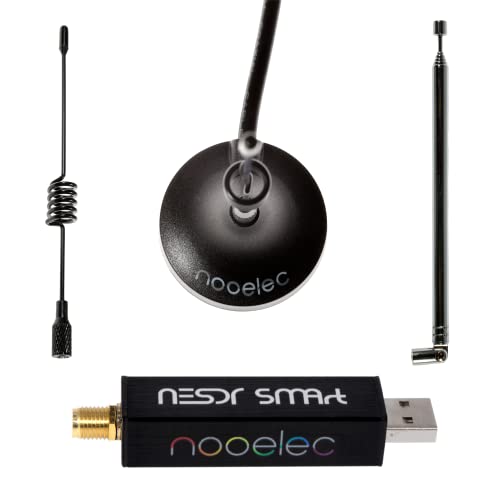
Nooelec
Nooelec NESDR Smart RTL-SDR bundle
Shows the whole spectrum at once, which turns a vague noise into a pattern of carriers with an identifiable spacing.
Check priceUnder $100
Palomar Engineers
Palomar Engineers feedline common-mode choke
Clip-on ferrites for mains leads, USB cables and network cables. The fix for most household sources.
Sold by Palomar Engineers, not Amazon. The link searches the category.

Fair-Rite type 31
FT-240-31 ferrite toroid core
A core for winding a heavier choke where a clip-on is not enough, and for the feedline itself.
Check priceUnder $25

AURSINC
NanoVNA H4 vector network analyzer
Confirms a choke actually presents the impedance it should across the bands you use.
Check priceUnder $100

Quansheng
Quansheng UV-K5
A cheap handheld with wideband receive, useful for walking a street and finding where a signal peaks.
Check priceUnder $50
Balun Designs
Balun Designs 1171 1:1 current balun
A proper feedline choke, which is the single most effective noise reduction most stations can fit.
Sold by Balun Designs, not Amazon. The link searches the category.
Common questions
Questions people ask about this
How do I find the source of noise on my HF bands?
Start with your own house. Listen on a battery-powered receiver, switch the whole consumer unit off, and see whether the noise disappears. If it does, switch circuits back on one at a time, then unplug devices on the guilty circuit. About half of a typical station noise floor comes from inside its own house, and this test takes twenty minutes.
What is the worst noise source in a modern house?
Powerline network adapters, by a wide margin. They deliberately inject a broadband data signal onto the mains wiring, which then radiates from every cable in the building across the whole HF spectrum. There is no filtering fix. The only solution is to replace them with Ethernet or wifi, and the improvement is usually dramatic and immediate.
Will a noise blanker fix my problem?
It treats the symptom and it works well on impulse noise such as an electric fence or ignition noise. It does very little against broadband hash from a switching supply, and it degrades the receiver on strong signals. Use it while you hunt, not instead of hunting, because removing a source improves everything including what you can hear on weak signals.
How do I approach a neighbour about interference?
Be certain of the source first, then approach as a neighbour rather than as an enforcer. Offer to demonstrate it on a portable receiver, and turn up with the fix in hand, since a ferrite clip or a replacement LED bulb resolves most household cases immediately. Most people are genuinely willing to help once they understand it is a cheap problem.
Can I do anything about noise from the power company?
Yes. Utilities have interference investigation teams and a legal obligation to address genuine radio interference from their equipment. Report it with specifics: dates, times, weather conditions and a location as precise as you can make it. Faults that are worse in dry weather and disappear in rain are classic hardware faults, and that detail helps them find it.
Keep going
Related on this site
Disclaimer Researched guidance for planning purposes, not professional engineering, electrical or legal advice. Antenna work, RF exposure, mast and tower work, grounding and battery handling all carry real risk that depends on your specific site and installation. Verify anything safety-critical against current FCC rules, the National Electrical Code and the manufacturer's own documentation, and hire a professional where the job calls for one. We research equipment from published specifications, regulatory documents and verified owner reviews rather than claiming hands-on testing we have not done.