Digital mode frequencies by band
Dial frequencies for every common digital mode, band by band.
The short answer
FT8 lives at 3.573, 7.074, 10.136, 14.074, 18.100, 21.074, 24.915 and 28.074 MHz in upper sideband on every band. FT4 sits about 6 kHz above FT8 on most bands, WSPR sits below it, and RTTY and PSK31 occupy the traditional data segments lower in each band.
- FT8 on 20 m
- 14.074 MHz
- FT8 on 40 m
- 7.074 MHz
- Sideband
- USB on every band
- FT8 bandwidth
- 50 Hz per signal
- RTTY bandwidth
- About 300 Hz
- Audio passband
- Set radio to 3 kHz
Digital modes use dial frequencies rather than the operating frequency you might expect, because the actual signals sit as audio tones somewhere inside the receiver passband. You tune the radio to the dial frequency in upper sideband, and the software places your transmission at an audio offset within the 3 kHz window.
That is why every station on FT8 shows the same dial frequency and a different audio offset, and why setting the radio to a narrow filter is a mistake: it cuts off everybody at the top of the passband.
FT8 and FT4
FT8 and FT4
Dial frequencies in MHz, upper sideband
| Band | FT8 | FT4 | Notes |
|---|---|---|---|
| 160 m | 1.840 | 1.843 | Night only |
| 80 m | 3.573 | 3.575 | Night, regional to long |
| 60 m | 5.357 | None | Channelised, check power limits |
| 40 m | 7.074 | 7.047 | The most reliable digital band |
| 30 m | 10.136 | 10.140 | CW and data band, no voice |
| 20 m | 14.074 | 14.080 | The busiest FT8 frequency worldwide |
| 17 m | 18.100 | 18.104 | Quiet and productive |
| 15 m | 21.074 | 21.140 | Good years only |
| 12 m | 24.915 | 24.919 | Good years only |
| 10 m | 28.074 | 28.180 | Solar maximum and sporadic E |
| 6 m | 50.313 | 50.318 | Sporadic E season |
| 2 m | 144.174 | 144.170 | Weak signal and meteor scatter |
Set the radio to upper sideband on every band including the low ones, which is a convention rather than a consequence of anything physical. Use a 3 kHz filter so signals at the top of the passband still decode. Setup detail is in getting started with FT8.
Other digital modes
Other modes
Traditional and specialist digital frequencies in MHz
| Band | PSK31 | RTTY | JS8Call | WSPR |
|---|---|---|---|---|
| 160 m | 1.838 | 1.808 | 1.842 | 1.8366 |
| 80 m | 3.580 | 3.580 to 3.600 | 3.578 | 3.5686 |
| 40 m | 7.070 | 7.025 to 7.050 | 7.078 | 7.0386 |
| 30 m | 10.142 | 10.140 to 10.150 | 10.130 | 10.1387 |
| 20 m | 14.070 | 14.080 to 14.099 | 14.078 | 14.0956 |
| 17 m | 18.100 | 18.100 to 18.110 | 18.104 | 18.1046 |
| 15 m | 21.070 | 21.080 to 21.100 | 21.078 | 21.0946 |
| 12 m | 24.920 | 24.920 to 24.930 | 24.922 | 24.9246 |
| 10 m | 28.120 | 28.080 to 28.100 | 28.078 | 28.1246 |
| 6 m | 50.290 | 50.300 | 50.318 | 50.2936 |
PSK31 and RTTY frequencies are conventions rather than allocations, and activity clusters within a few kilohertz of the listed figures. WSPR frequencies are precise, because the mode occupies a 200 Hz window and the whole point is that everybody uses the same one.
Bandwidth and duty cycle
Mode characteristics
What each mode occupies and demands
| Mode | Bandwidth | Duty cycle | Decode threshold |
|---|---|---|---|
| FT8 | 50 Hz | 100 percent | About -21 dB |
| FT4 | 90 Hz | 100 percent | About -17 dB |
| JS8Call | 50 Hz | 100 percent | About -24 dB |
| WSPR | 6 Hz | 100 percent | About -31 dB |
| PSK31 | 31 Hz | 80 percent | About -10 dB |
| RTTY | 300 Hz | 100 percent | About -5 dB |
| Olivia 8/250 | 250 Hz | 100 percent | About -14 dB |
| SSB voice, for comparison | 2,400 Hz | 20 to 50 percent | About 0 dB |
Every mode in this table except SSB transmits at essentially full duty cycle, which is much harder on a transmitter than voice. Run 30 to 50 percent of rated output and size the power supply on its continuous rating, per sizing a power supply.
Setting the radio up
- Upper sideband on every band, including 80 and 40 where voice convention would say lower.
- Use the data or USB-D mode if the radio has one, since it bypasses the microphone audio chain and its processing.
- Set the filter to about 3 kHz. Narrow filters cut off stations at the top of the passband for no benefit.
- Turn off speech processing, noise reduction and transmit equalisation. Every audio process degrades a data signal.
- Set drive so the ALC meter barely moves. Visible ALC action means compression, which splatters across the band.
- Verify the computer clock. FT8 and FT4 slots are aligned to the wall clock and drift beyond a second stops decoding entirely.
What a digital station needs
The digital chain
Radio, interface, supply and an antenna. The interface disappears if the radio has USB built in.

Icom
Icom IC-7300
Sound card and CAT control on one USB cable, plus a scope showing which slots are busy. Nothing else to buy.
Check priceUnder $2,500

Digirig
Digirig Mobile digital modes interface
A tiny combined audio and CAT interface for a radio without USB. The simplest digital add-on.
Check priceUnder $100
Tigertronics
Tigertronics SignaLink USB interface
An isolated interface with a physical level knob, which makes drive adjustment far easier than a menu dive.
Sold by Tigertronics, not Amazon. The link searches the category.
microHAM
microHAM USB III interface
A full station interface with audio, keying and CAT, properly isolated throughout.
Sold by microHAM, not Amazon. The link searches the category.

Astron
Astron RS-35M-AP linear power supply
A linear supply with no switching noise, which matters more on digital where the noise floor decides what decodes.
Check priceUnder $1,000

Xiegu
Xiegu G90
Twenty watts with a built-in tuner, comfortable at digital duty and easy on a battery.
Check priceUnder $500

JYR
JYR8010 8-band end fed half wave, 150 W
A multiband wire, which is all the antenna FT8 needs to work the world at reduced power.
Check priceUnder $100
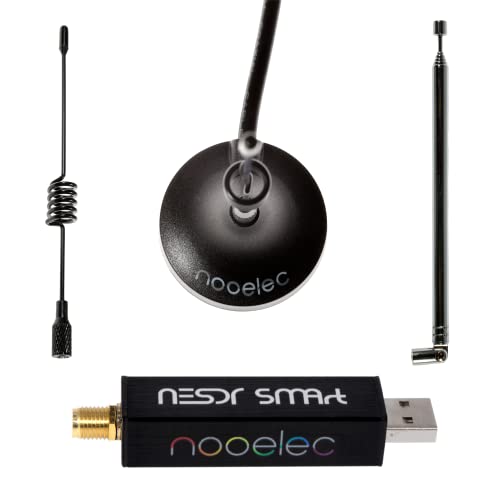
Nooelec
Nooelec NESDR Smart RTL-SDR bundle
A wideband receiver for watching where digital activity actually is across several megahertz.
Check priceUnder $100
Common questions
Questions people ask about this
What frequency is FT8 on 20 metres?
14.074 MHz, upper sideband, and it is the busiest digital frequency in the world. That is the dial frequency; individual stations appear as audio tones spread across the receiver passband above it. Set the radio filter to about 3 kHz so stations near the top of the passband still decode, and use upper sideband on every band including the low ones.
Why is upper sideband used on 80 and 40 metres for digital?
Convention. Voice operation on the low bands uses lower sideband, but every digital mode uses upper sideband on every band so that audio offsets and reported frequencies mean the same thing everywhere. Using lower sideband inverts the tones and nobody decodes you, which is a common first-day mistake.
What filter width should I use for digital modes?
About 3 kHz. It is tempting to narrow the filter to reject interference, and doing so cuts off every station whose audio offset sits above your filter edge. Since decoders process the whole passband at once and find every signal in it, a wide filter means more decodes. Narrow filters belong on CW, not on FT8.
Do digital modes damage the radio?
Running them at full output does, over time. Every common digital mode transmits at essentially 100 percent duty cycle, which heats the finals continuously in a way SSB never does. Run 30 to 50 percent of rated output, give the radio airflow, and size the power supply on its continuous rating rather than its peak figure.
What is WSPR for?
Propagation measurement rather than contacts. WSPR transmits a very low power beacon signal in a 6 Hz bandwidth and reports every reception to a shared database, which produces a live map of which paths are open. It decodes about 10 dB below FT8, and running it is a genuinely useful way to find out what your antenna is doing.
Keep going
Related on this site
Disclaimer Researched guidance for planning purposes, not professional engineering, electrical or legal advice. Antenna work, RF exposure, mast and tower work, grounding and battery handling all carry real risk that depends on your specific site and installation. Verify anything safety-critical against current FCC rules, the National Electrical Code and the manufacturer's own documentation, and hire a professional where the job calls for one. We research equipment from published specifications, regulatory documents and verified owner reviews rather than claiming hands-on testing we have not done.